Sunday, May 31, 2020

how to install a CCTV camera inside elevators

Elevators are very critical from safety aspect in mid-to-high rise buildings where tenants may spend a fair time in a narrow/closed space, possibly accompanied with complete strangers. Especially in matters of women, kid & senior citizen safety. Unfortunately a robust elevator camera installation is not very easy to do as in most cases a retrofit install is required, because the elevator company has not supplied CCTV functionality in the elevator car. many apartment buildings may just skip this and put cameras in tower entrance lobby as a potential but misplaced substitute, thinking it can identify suspect in case of crime, whereas people can get into lift car from any level and get off at any escaping suspicion.


Here are some ways it can be done:

(a) A standalone CCTV camera in elevator car with onboard SD card storage
(b) A wired IP CCTV implementation based on travelling ethernet cable
(c) A wireless bridge CCTV solution

Illustrations of (b) and (c) is described here:


Our team has done installations of both (b) and (c), and we will list issues and quirks with both. We do not recommend (a) unless the lift vendor has done it and secured at least the recorded footage in a vandal-proof manner. We strongly recommend that elevator cameras be live monitored due to the safety angle of tenants. But sometimes it maybe a quick way to implement at very low cost, considering that its easy to get 5V/12V DC-DC UPS and power from elevator car. 

Based on our experience, we go back to our 3 basic principles and make some recommendations:

(1) Use Vandal resistant domes rather than Bullets (which can be turned away) or tamperable domes (with easily exposed lenses or glass). the elevator car height is less. And no exposed cabling strictly. 
(2) Preferably live monitored
(3) Mount in a top corner which can see lift console (where people are getting in and out) and higher than  human heads
(4) Use a wide angle lens (2.8mm or better) to cover as much of the small lift car as possible even at the cost of some lens barrel distortion.

Here is one example on field of view of elevator camera:

https://www.youtube.com/watch?reload=9&v=E_BZS3whDWw

Generally elevator companies will not supply an elevator car with a travel cable that has spare conductors to run Ethernet over Power OR Ethernet twisted pair cabling. Therefore it has to be retrofitted. Elevator vendors usually do not encourage this (or the use of spare) as they do not want any unknown application to piggyback their installation, which they have not tested and may cause potentially harmful impact to their system in some scenario. A threat of voiding warranty is common deterrence, even if low voltage electrical signals are involved. 

The choice between (b) and (c) however has more *installation issues than what the articles referred above describe. Here we list a few for each:


Wireless Bridge CCTV Installation
(i) If you chose a Wireless bridge method, be sure that you do not use 2.4G wifi, but either TDMA or 5G wifi. Usually lifts are provided in pairs of 2,3, etc to handle traffic and redundancy and two 2.4G bridges can interfere with each other when sending bit rate intensive video or even interfere with wifi network of building tenants. The entry level bridge is not the most ideal choice here, even though a camera may need only 2-10 mbps of bandwidth. 
(ii) The wifi bridge method will usually involve one bridge AP on top or bottom of elevator car and another in elevator machine room or pit. While its easy to arrange UPS power in lift room, it might get tricky to do so in the lift pit limiting practical deployment only on top of lift car and machine room floor (top of lift shaft) in some cases.
(iii) The UPS supply for camera in elevator car must be considered. Many elevator systems *completely  shut off power to the elevator car when its not in use for more than X minutes. No use periods may be large (running into hours) on holidays/weekends/night time/etc. A UPS can be installed and it can ensure continuity of operations, but most small UPS will run only 1-2 hours before their battery deep discharges. Such deep discharges and very frequent loss of power is not good for battery in the UPS and frequent charging-discharging will reduce battery life highly (in cases even below the warranty period), creating a maintenance nightmare if there are scores of buildings (residential) in the system and batteries failing randomly. Besides the camera and Bridge may need 30s-1min atleast to boot up and connect once power gets restored, missing the events of the first elevator user after long break. Such frequent outage can even corrupt data on any onboard SD card used as backup, till connectivity gets restored.
(v) With wireless Bridge implementation it is easier to introduce new applications in elevator car like intercom phone, Wifi, etc.
(iv) The big advantage is no *practical limitation on building height (bridge signals run out of directional antennas whose range is in kilometers) and less plus simple labor work. Therefore it is favored by installers, who anyways enter into AMC contracts for maintenance
(v) However good the installation, their is always a question mark on the stability of wireless links compared to wired. So the perception of unreliability sticks.


Wired CCTV Installation
(i) This involves installation of your own traveling cable along with (or substituting) the lift OEM supplied cable. Adding is the preferred option by tie it on top or below the OEM supplied traveler using thick and strong cable ties at 1-2 feet interval. This involves lot of labor and therefore is the single biggest reason why installers do not prefer this method.
(ii) cat 5e/6 cables can typically be of max 100m length before needing a PoE extender or switch. In extend mode, the cables can run typically to upto 250m. a floor height is usually 4 meters concrete floor to concrete roof. So a maximum 20-25 floors can be supported using regular switch or maybe 50 floors using PoE extender and special switch.
(iii) Elevator cables are of high quality and long life (~20 years). But what about 3rd party supplied travelers ? Their is always a question mark on them. We have being using a 3rd party cable for 3 years now and it seems goof enough, but not sure whether they it last for 5 or 7 or 10 or more years. For nearby complexes wired installation have not even lasted 1.5 years.
(iv) IP cameras need 2 twisted pairs to work (cat 5 only) as it can support 100 mbps. We may need other applications in future, which may throw up a question whether we need to go for a add-on traveler with 4/8/12/16 twisted pairs to avoid reworking and enable extensible infrastructure.
(v) Not all of the travelling cable actually travels. The cable can bolted to elevator shaft at mid way point. Vendors try to save costs by using non traveling cable in this bolted segment and introducing a join with traveling cable. So one side of this join the cable does not move while the other side moves subjecting the joint (splice using keystone or coupler) to a lot of mechanical stresses decreasing its lifetime and requiring occasional re-crimping, keystone replacement, punch-downs. It could be very frequent & frustrating if no design effort is made to minimize mechanical stress on joint,.  This has been a lesson learning by us for part of our 60 elevator system.
(vi) The big plus of this solution is its simplicity and stability. Less active nodes, less failure points, smooth performance, Power and data over single cable (PoE), low voltage electrical signal handling.

For our apartment installation we initially used Wireless for about 30% of the lifts, but then implemented wired for the remaining 70%. Now its 100% wired. It could have easily being the other way round. Our biggest wish at the end of the day is that such data solution should be provided by elevator OEMs as they are fully and truly in control of everything [For eg., they can shut off all but supply to one conductor pair in energy saving mode and this pair may be connected to a dedicated/maybe bigger UPS (or UPS line) in machine room, include cat 5e/6 cables in traveler, etc.]


- Suman Kumar Luthra @ APRC-P3 Telecom Sub-Committee

Saturday, May 30, 2020

What type of PoE switch should be used for PoE based IP camera system ?

For *small home/enterprise installations, physical deployment area is small. Any regular unmanaged switch of 4/8/16/24/48 port capacity based on the number of cameras needed would suffice. Its simple, will work reliably and if their is a problem, it can be restarted. We do not think such installations would even need PoE extension features (use for upto 250m cable instead of the regular 100m). Generally their is only one hop in LAN (i.e camera device and one/two recorder connected directly to one switch). And switches can frequently be 10/100 fast ethernet instead of gigabit ethernet or better. 

However, when handling large installations, scale complexities arise

(a) Cable lengths of some camera points may increase beyond 100m in corner cases. A switch with PoE extension feature is a nice add on.
(b) Their is more risk of lightning strikes as more outdoor devices could be present and Ethernet port surge protection may be nice to have feature. 
(c) Instead of one switch you may need a network of interconnected switches often connected by  OFC links which are longer than 100m
(d) Their would be need to remote management equipment. Ability to hard reboot individual IP cameras by cycling power is at times useful in recovering from some faults (mostly IP Camera firmware related).
(e) The same network would likely need to support non-CCTV applications and different applications may need a logical isolation (VLAN)
(f) For large installations even though single camera bandwidth is 2-10 mbps, the aggregated bandwidth on some link(s) may exceed 1000 mbps and therefore require link aggregation.

Therefore from IP networking angle, VLANs, STP, Link aggregation, PoE On/Off, remote switch reboot are features that may be needed( and very useful) in large installations, but are totally absent in unmanaged switches.

Such large installations should use at least 10/100 *smart managed PoE switch with gigabit uplinks, Or better a *smart managed 10/100/1000 ethernet PoE switch. PoE Extend and Surge protection are highly desirable. An unmanaged switch can be used to augment the periphery but is better to avoid AFAP and definitely should not be used as a first choice. Unfortunately their is not much choice in smart PoE switches of less than 10 ports and they are also not value for money choice, with 24 port variations causing only a bit more, but much more expensive than a small unmanaged 4/5/8 port PoE switch

Our network uses multiple applications and switch usage is 80% CCTV and 20% non CCTV and so we have initially deployed 10/100 smart web-managed switches which also support non-CCTV applications with an acceptable constraint of 100 mbps per port throughput. Few edge is supplemented by small unmanaged switches, which have given the occasionally physically rebooting job. The backbone is kept full Gigabit with link aggregation support and this system handles more than 450 IP Cameras and 100 Wifi access points. And their is enough room spare to grow for years with new applications like voice (intercom), building automation, etc. 


- Suman Kumar Luthra @ APRC-P3 Telecom Sub-Committee

Do I need a 802.af (PoE) switch or 802.3at (PoE+) switch or even better ?

(1) PoE Port can supply upto 15W of power to device, while PoE+ can supply 25W approximately. Other classes like 802.3bt, etc can supply even more. 
(2) A PoE camera typically uses 6-9W of power during day (based on the resolution) and additionally another 2-3W of power during night due to IR LEDs firing up in low light

Therefore most general cameras can be supported using a standard 802.3af switch only and 802.3at is not required. same applies to entry level Wifi Access Points too. Be careful and note down the total power supplied by switch (capacity) and make sure the connected cameras draw do not exceed this otherwise, few cameras may randomly shut off and on.

However specialized camera like LPR, ANPR, PTZ, etc which are bigger and more CPU intensive require more power. They need 802.3at or better and therefore would need a PoE+ switch. However this is not optimal as the quantity of such cameras is usually less than than the general PoE camera. The best balance therefore is a camera with 15-30% PoE+ ports and 70-85% PoE Ports, rather than a switch with 100% PoE+ ports. 

In our apartment setup, we have not used specialized camera till date and the maximum power drawn we have seen with almost all ports full is around 120W out of the 193W maximum that our switch can supply. So we think that in future of we introduce a few such special camera, then we should be able to accommodate them because our switches support upto 4 PoE+ ports


- Suman Kumar Luthra @ APRC-P3 Telecom Sub-Committee

Friday, May 29, 2020

Should I use H.264 or H.265 cameras ?

These are encoding schemes for video and better encoding results in

(1) Less storage capacity requirement on the storage for storing events for given time. 
(2) Less bandwidth requirement on the network 

Quality wise, even though more compression means loss of information, practically their is not much difference seen by human eye, unless you take a magnifying glass and run it over each decoded frame individually ;-))

Whether you use a camera with onboard SD card storage or hard disk in NVR or cloud storage, less is better (and cheaper). Its better because for a given storage you will be able to store more days/weeks/months of footage (highly desirable) at lesser cost, do less rewrites of flash storage areas resulting in longer life. 

IP cameras may support MJEG, H.264, Proprietary H.264+ or similar synonym, H.265, Proprietary H.265+ or Ultra H.265 or similar synonym, etc in increasing order of compression efficiency. The "+" is a surveillance video specific compression optimization. In general H.265 is 50% more compressed than H.264, while H.265+ can be upto 1/5th the size of H.264 and therefore very attractive to use. It immediately result in less switching load on each link and therefore more cameras and other applications can be supported in one area.

Therefore, if possible get the PoE cameras with the better codec AFAP. However keep in mind, the more compressed the video is, the playback/encoding is tougher. H.264 will practically be decoded by any old computer or mobile device, but H.265/H.265+ needs hardware acceleration for decoding (and encoding) to give smooth playback, which means you need newer generation Intel/AMD CPUs or GPUS with built in H.265 hardware decoding . However H.265 decoding is more easier on ARM SoCs because of their GPUs adopted hardware decoding quite early on. 

A negative impact is expected to happen on battery powered cameras. Because the encoding is heavy it will very negatively impact runtime on single charge and therefore H.265 (and H.265+) type battery powered wire-free cameras are relatively rare. 

All our apartment PoE IP camera system uses H.265+ cameras only. This was a conscious purchase decision made when H.265 and H.265+ were just emerging in the market (we were early adopters). And the only wireless (incl. wirefree) cameras deployed all use H.264.


- Suman Kumar Luthra @ APRC-P3 Telecom Sub-Committee

Saturday, May 23, 2020

How to design an IP network to carry surveillance traffic in large multi-building apartment complexes ?

Generally, every apartment should have some mechanisms like cable trays or raceways to interconnect all buildings for both internet and power. And we recommend that those be used to create the cabling infrastructure. This would essentially be a Wired Ethernet LAN built using Smart switches in a hierarchical fashion as Cisco outlines in their design philosophy by using horizontal layers like Access (10/100 mbps PoE with Gigabit uplinks at a bare minimum), Distribution (10/100/1000 mbps non-PoE) and Core (1G-10G non-PoE)


For smaller project setups such layering and smart switching maybe an overkill, but for large setups they should be used to ensure stability, maintainability, reliability and extensibility. Unfortunately many system integrators use crude methods like:

(1) Daisy chained switches instead of connecting them in Hub-Spoke fashion
(2) random mixture of fiber and copper links based on cable length required to nearest daisy chain link

to skimp on labor effort & costs, and end up delivering a very bad IP networking system, because they have not paid any attention to link capacity and load (very uneven links), progressive switching delays, reliability impact if one switch goes down, etc. 

Please also note that low voltage cat 5e/6 cables should never be run in conduits parallel to electrical lines (they pose both safety - high voltage getting onto low voltage lines in case of rat bite or other accident triggered short circuits AND electromagnetic interference problems) in raceways/trays/walls/ceilings, but its safe to run Optical fiber cables.

In the rare scenario that their are no raceways/cable-trays available because the builder did not install them, you may have to do so OR use wireless PtP/PtMP links over buildings to create a backbone IP network as shown below:


The main requirement for the above is line of sight and each link is constrained by the speed of wireless links. It may work for a moderate number of cameras, but will definitely not scale up [200-500 mbps may be the maximum link speed] to accommodate more applications. nevertheless they may be the only networking choice if both wired and cellular are not practical. This type of setup can also be used to augment an otherwise proper wired networking setup in case their are certain areas to which cabling is not feasible (still they have to get power somehow).


- Suman Kumar Luthra @ APRC-P3 Telecom Sub-Committee

Friday, May 22, 2020

Should we use Cat5e or Cat6 cables for wiring CCTV cameras ?

PoE based IP cameras need a steady bandwidth of about 1 mbps per megapixel resolution in case of H.265+ and up to 5 times this in case older H.264/H.264+ cameras are used.  These cameras usually do motion triggered recording at the NVR only (as cameras do not have PIR sensors) by comparing frames. H.264+ is on its way out in these cameras and will be universally replaced by H.265 in a few years time and H.265 is remarkably efficient as resolution increases and bandwidth/storage does not grow linearly always as resolution increases.  

Whatever be the outcome of this predication, the fact remains that no IP camera need more than 100 mbps or fast ethernet bandwidth even for higher resolutions, and most not even 10 mbps. This is not expected to change in the near foreseeable future. Therefore, to support such bit rates only a cat 5/5e  twisted pair ethernet cable with 2-pairs are sufficient. Whereas a cat5e cable commonly available in market will have 4-pairs and support 100 mbps for 100m length, and a cat6 would do 1000 mbps for 100m length. Therefore its absolutely not required to use cat 6 cables for IP cameras and cat 5/5e is just good enough. You should skip cat 6/6a and save the extra premium for something else.

Generally conductors 1-2-3-6 (pairs) are used in an ethernet cable for IP cameras and power & data is sent on the same pairs by PoE switches (endspan devices - Mode A PoE). However some older NVRs and PoE injectors (mainly midspan devices - Mode B PoE, some or not all which are not fully 802.3af/at standard compliant) prefer to use the spare pairs (4-5-7-8) and this may cause problems of inter-working with some IP cameras and injectors/NVRs. It is also rare to find cables with 2 pairs and some cameras would not support 2-pair cables for PoE. Further in-depth analysis on this subject can be had from this URL.

Therefore  you may stick to regular 4-pair cat 5e of good quality . It will give you the added flexibility of splitting the Ethernet cable to support two cameras of one cable in future( as shown below), plus be generally compatible with most camera brands and models. 


However be careful and not use using cat5e cables in switch-switch links. These links may require more than 100 mbps throughput for upto 100m in case copper and Optical Fiber for longer runs and therefore cat 6/6a or OFC is a better fit and can support speed such as 1 gbps., 2.5 gbps, 5 Gbps and 10 Gbps. cat 5e can support 1000 mbps for upto 33m only or very short lengths.

DISCLAIMER: Exception to the above assertion is deployment of cameras in very high EMF requirements (we haven't found one in a residential complex setup), where the headroom of Cat 6 and cat 6A is higher (23 AWG/250Mhz and 22AWG/500 Mhz respectively compared to 24AWG/100 Mhz of Cat 5e) makes it a better choice at the expense of more cable weight, cable stiffness and diameter, installation difficulty, etc.


- Suman Kumar Luthra @ APRC-P3 Telecom Sub-Committee

Saturday, May 16, 2020

My PoE Camera length is 110m. Can my switch, cable and handle 10% extra length ?

It might. And you may may get away with it. However it is strongly recommended to not do it. Reasons:

(1) Firstly the max allowed category 5/5e/6/etc cable length is 100m including patch chords. Any joins (splices) like patch chord to wall outlet, Imperfect terminations creates impendence issues and slightly reduces the maximum usable length and generally 95m is considered safe.
(2) Installers maybe tempted to skimp on effort by trying not just 110m but even 120-140m. Many come from analog CCTV camera installation background, where extra length causes deterioration in video quality (few frames or part of frame), which may not be noticeable or bothersome to human eye. And they may not hesitate to extend logic to Digital IP cameras as long as "it works".
(3) Longer cables cause transmission errors at ethernet level and cause IP cameras to occasionally go up and down depending on what frame is lost/corrupted. It will manifest in frequent "NO-LINK" or "OFFLINE" messages on NVR screen OR few ping failures or longer ping response times with larger packets (say 40-65K) and so on. It will just result in camera instability at some point.

Therefore we recommend to stick to 95m max. If their is a need to run longer runs, we can use a PoE Extender (instead of new switch in between which will have complexity of introducing UPS power supply) like illustrated below:


Try to connect to PoE+ port if available and use PoE+ extender. The extender is like an ethernet repeater which tunnels Power too. A part of power is consumed by the active extender (1-2 W) and more power than usual will be taken by resistance of extra cable lengths and we need to sure that their is enough power available at the camera. With the above method, 200m cable lengths can be supported for IP cameras (we have used around 160m reliably on one outdoor IP camera).

Their is another interesting application of the above solution as it can extend both Power & Ethernet and that is to extend ethernet only. Suppose you have a backbone cable (switch-switch) length of more than 100m and you want to avoid fiber. a good number (more than 2) of these can be chained. If backbone switch port is not PoE enabled a PoE+ injector can be introduced on one side to power the extenders and then run them for longer distances. This can be used to substitute Fiber in apartment CCTV setups (*fiber work is costly and it needs specialized labor) with Cat6 UTP cable. Unfortunately this is a trick we also missed.


- Suman Kumar Luthra @ APRC-P3 Telecom Sub-Committee

Friday, May 15, 2020

How to shift my IP camera after installation to a nearby location with better Field of View

Not everything will turn out perfect the first time in large projects. Adapting is part of the learning process also as camera positioning requirements may change every time. Unfortunately at times cables while being laid are also cut to the required length, which makes any change hard, as the cable will not reach the new location. It may also happen that sometimes the installer will cut the cable length  bit shorter during the laying work itself resulting in an installation problem. 

So do we have to relay the cable again ? Not really.

You can extend ethernet cables (as long as they totally are under ~95m from nearest switch or extender), by using splicing methods like:

(1) Use a RJ45male-RJ45male coupler.


This method works, but inexpensive poor quality couplers abound in market and may not give a strong joint. Therefore attention must be paid to the quality of coupler, its type (UTP one for UTP and STP one for STP) and that it does not come off with a little bit of tugging at the cables, otherwise you will have occasionally avoidable maintenance works. 

(2) Use keystone (IO module) 


keystone joints are very strong on both sides as they have been tried and tested for wall outlets where the patch chords move all the time. We recommend this method over the coupler for reliability. Also take care that coupler types (UTP for UUTP cables, and STP for STP cables) are matched, otherwise it may cause a break in earthing functionality for STP cabling. 

Both the splicing (joining) connectors should be put in a small PVC box or Conduit 2-way-junction box to allow for maintenance, checking & repairs in future.


Please take care that these type of junction box is required IP grade, if used outdoors.


- Suman Kumar Luthra @ APRC-P3 Telecom Sub-Committee

Thursday, May 14, 2020

How to correctly mount an outdoor IP camera ?

First and foremost ensure that the IP camera is atleast IP65 rated to be suitable for being mounted outdoors where it is exposed to sun, rain, humidity and potentially a big variation in temperature. An indoor rated camera must not be used outdoors in any case, otherwise it will not survive. 


Secondly. An outdoor rated cameras housing is actually IP rated. Not the cable stubs. Therefore no cable stub or connector should be exposed to elements otherwise it will get spoiled completely in a couple of years, requiring camera repairs or replacement in worst case. Besides that vandals and rodents can easily damage vulnerable exposed parts.


The above are good examples of outdoor camera installations . The Cable enclosed in conduit or raceway (casing) enters the junction box behind the camera, leaving no part of the cable exposed. Similarly the cable stubs (ethernet and DC connector stubs) are also enclosed inside and the actual cable join is totally enclosed in IP grade junction box making it safe from corrosion, rust, etc.  Also ideally the conduit should enter the junction box from bottom (and preferably through glands) and not sides or top, so as to ensure that their is no chance of water leakage in case of rains.  This is a point that installers forget in a hurry. 

Another important point to consider mandatorily  is that the junction box itself must be at least IP65 rated. You should never use indoor PVC box outdoors. And that the lid has at least 4 screws (one at each corner) in case of square boxes and 6+ screws (2 additional in middle) in case of rectangular ones, so that bigger camera (1 Kg+) can be safely mounted and box lid does not open due to mechanical stress of camera weight. A Hensel box is a better choice even if the color does not match the wall paint as its very sturdy and IP66 rated.

For indoor cameras, the requirements are less strict:

(1) their is no need to use IP rated boxes. A regular PVC electrical  box of sufficient rigidity is good enough in most cases if camera weight is less than 500g
(2) Cables can enter junction box in conduit from any direction, though it s still required that no part of cables be exposed (vandal and rodent resistance is the driver here)
(3) For heavy cameras ( 1 kg+), 6+ screws, sturdy construction (preferably with decent aesthetics) are still applicable. If you do not get a god fit,  stick to the IP rated hensel box and comprise a bit with aesthetics and color matching. 


- Suman Kumar Luthra @ APRC-P3 Telecom Sub-Committee

Wednesday, May 13, 2020

When do I use the DC jack provided with IP cameras ?

PoE IP cameras work from 802.3af PoE port where 48V DC is used and a 12V DC jack.


 These are sort of passive redundant supply methods and are useful in certain scenarios:

(1) At times due to corrosion, physical damage, rat bite, or internal circuitry malfunction you may run into a situation that the camera gets powered using DC jack but not with PoE Port. In such access the camera life can be *potentially extended (provided ethernet functionality works) without repair, by using a PoE Splitter, which splits 802.3af into a regular ethernet port and 12V DC. the DC port can be connected to the Camera's DC jack by splitter supplied barrel jack cable, and the ethernet port can be connected to camera using patch chord. However better is to try and get the camera repair first and only if the RMA center cannot fix it, should you fallback on this method. And while installation, splitter should be enclosed in junction box.

The following link may also be useful for addressing this problem in a DIY manner

https://www.use-ip.co.uk/forum/threads/replacing-a-faulty-hikvision-poe-connector.621/

(2) Sometimes it maybe required to install an AP (with dual ethernet ports) and PoE IP camera at same location. In this method, a PoE/PoE+ splitter can be used to split first the ethernet and DC power signal. Then the DC over signal can be split further into 2 parts one powering the AP and one the Camera. The ethernet port of splitter is connected to AP primary port while the camera gets connected to the secondary port of AP. It does not stop and this, we can have 4-way DC power splits  (12V, 2A) and power complicated setups like switch (<5W), Camera (<10W), AP (<10W)  and other device with 802.3at (PoE+).

(3) Replacing existing analog cameras By IP and reusing the Analog system wiring (Ethernet over coax or MoCA, and DC from cable)


Of-course the DC jack can so be used if UPS power is supplied from nearby outlet and only ethernet  networking function is required from nearby point. 


- Suman Kumar Luthra @ APRC-P3 Telecom Sub-Committee

Tuesday, May 12, 2020

Do IP cameras need earthing ?

Before we answer this question, we need to consider two aspects

(1) Is the camera going to be installed indoors or outdoors ?
(2) Is the site in a lightning prone area ?

Generally property developers install a lightning arrestor rod on top of buildings which is earthed. However this is no guarantee that lightning cannot strike any other area on that building, just that it reduces the probability.  Therefore the answer to the above two follow-up questions assumes more significance. 

Ans (1). An indoor camera DOES NOT need earthing or grounding. An Outdoor one does.
Ans (2). If the site is not in a lightning strike prone area, then any heavy weight earth protection will be very hard to justify, otherwise its should be implemented


Our site is India (Bengaluru) and that is not under a high risk zone. Outcomes incase of a strike can be one of the following:

(a) The strike NEITHER damages camera NOR SPREAD on the network
(b) The strike DAMAGES the camera but DOES NOT SPREAD on the network
(c) The strike DAMAGES the camera and SPREADS to other devices on the network potentially damaging them also, causing large scale damage

(c) is a no protection outcome while (a) is total protection. (b) is the balance point. If the site is a lightning prone zone, we have to invest in achieving (a) or (b) in worst case with (c) being unacceptable. If in a moderate probability zone (b) should be the target with (c) as being unacceptable. If in a safe zone , you maybe *tempted to ride your luck and just settle for (c) or no protection with (b) if you have spare cash, energy, time and possibly less appetite for gambling.

The mechanisms used to implementing earth are:

(1) The IP camera (or any outdoor device) housing is earthed - This maybe impractical to achieve


(2) The Outdoor IP camera cabling is Foiled (FTP) with drain wire [ensure its bonded to RJ45 shielded STP connectors only]


(3) Rack to rack ethernet connection is done using OFC uniformly instead of copper
(4) The switch supports lightning surge protection (ours don't) or an in-band PoE surge protection device (as shown below) is installed


(5) The switch chassis, rack and all metal parts in the rack is bonded to earth plate and that is earthed.


(6) The power supply to racks & switches is 3-pin (which has earthing) and it is ensured that ground is not open.

If all (1)-(6) of the above are implemented we will get outcome (a) or outcome (b). If (2) -(6) are implemented, likely outcome will be (b), which is what we want. If (4)-(6) or lesser are implemented the outcome will likely be (c) and if your luck holds up, (b). Anything less, you will probably ruin your equipment or endanger worker safety without lightning strikes even coming into the picture.

Our team has presently implemented (5),  (4) & (2) and we want to implement (3) and till that time we are riding our luck (3 years now). Mainly not due to monetary or effort concerns, but due to in-band PoE surge protection device un-availability in local market [we expect this to change and then we will implement (3) also, but till then we are riding our luck].


- Suman Kumar Luthra @ APRC-P3 Telecom Sub-Committee

Monday, May 11, 2020

How to judge the quality of installed cables connecting cameras and switches ?

This is very important question for CCTV maintenance. A bad quality of cable or cable termination is going to create instability during lifecycle and involve otherwise avoidable efforts of stakeholders.  Their maybe many school of thoughts on how  cable has to be run or how it has to be terminated, but irrespective of that the outcome determines the quality not the means. And their should be a way of predicting outcomes to a fair degree, so that we can control them to a fair degree too.

Anyways, cable installation quality can be judged once a device is connected. And a rudimentary process could be using the ping layer-3 utility based on below principle and method:

(1) Generally CCTV network will be one a single LAN (VLAN). On a LAN (VLAN), routers are not involved and ARP protocol is used to determine destination host and dispatch packets
(2) Ethernet MTU is 1500 bytes typically (default) on IP cameras, switches, recorders, PCs, etc which is rarely changed by any installer. MTU means maximum frame size that is used on the Ethernet based LAN (VLAN). Jumbo frames are disabled also usually by default. 
(3) If a node sends a packet of 1500 bytes, it will be fragmented into multiple frames, transmitted and reassembled at the other end. 
(4)  The re-assembly of the fragments is done by IP layer, but the retransmission is done by Transport layer protocol (UFP/TCP/SCTP/etc). The trick is that connection oriented protocols (TCP/SCTP) do this retransmission while connectionless transport protocols like UDP and layer-3 Protocols (like ICMP) don't. Ping  has no transport layer functionality and uses raw IP packets
(5) If we send a 65500 byte ping packet from one host to another, it will be split into 44 packets based on MTU of 1500 bytes and sent as 44 frames on ethernet.
(6) If the cable or termination is faulty (which means a bad link), one or more of these frames will be lost and the IP layer entity ping will not get the ping packet, resulting in the ping client seeing a ping failure. We do this in a *closed loop [completion of one ping request-response cycle triggers next one] and immediately the faults will increase and number of ping packets sent in a given time will decrease. Our Web-Smart Switches record these as Rx/Tx Errors while there is no such statistics available on Unmanaged switches or Easy Smart switches.  
(7) This observed anomaly can be used to come to an early conclusion that the cabling is not properly installed, needs checking and some rework 

Health Check function of  Hikvision (we use this camera brand) Bulk Configuration Tool uses ICMP (and not Transport layer UDP/TCP/etc) which means there is no retransmission of packets where an underlying ethernet fragmented frame is lost. If a fragment is lost, the ping ICMP request is deemed as dropped (or failed). This tool is used by us to determine.

A bad cable will stay bad,  but a bad termination will likely degrade over time and ultimately result in a down-camera or down-AP in double quick time, That is why we seek, isolate and fix these issues upfront to avoid encountering future camera fault/downtime. 


- Suman Kumar Luthra @ APRC-P3 Telecom Sub-Committee

Sunday, May 10, 2020

Do we need to speed test cabling ?

For any PoE IP CCTV network, the following types of links are there:

(1) Camera to switch/NVR - This needs bandwidth around 1 mbps per megapixel resolution when using H265+ codec
(2) Switch to Switch links (in Backbone Network) - This is dynamic and depends on the camera quantity and load connected towards the camera side. The bandwidth required is N times what is per camera bandwidth indicated in (1) and will change with time as installation grows.
(3) Switch to NVR - This may need speed based on NVR capacity but can be assumed to be 10 mbps/channel in either direction. A 32 channel NVR will need peak 320 mbps bandwidth in either direction. 

For (1), throughput is not of a big concern and 100 mbps is more than enough. Its speed testing may be entirely skipped as practically no more than 10 mbps ever gets used even with a 8 MP camera. But for (2) and (3) each link should be verified to be at least 1 gbps capable. 

iPerf is the best command tool to validate the capability on link performance and should typically yield 930 mbps+ in either direction (when done individually). We recommend that during or after installation an iPerf testing (using two laptops) on such links be done to avoid running into hard to debug obscure problems later. 


- Suman Kumar Luthra @ APRC-P3 Telecom Sub-Committee

Saturday, May 9, 2020

Where all are IP typically cameras mounted and any difficulties arise in mounting them ?

IP Cameras may need to be mounted on surfaces such as walls, ceilings, false ceilings, metallic partitions (eg. lift) or Poles. This involves some complexities challenges such as:

(1) At times poles are imaginary during design and must be first installed before camera is mounted. The  installation of pole itself may be on ground, and on railings
(2) At times camera may need to be mounted on ceiling but at a height lesser than ceiling (or at a virtual ceiling that exist in air). 
(3) their maybe no space or flat surface to drill screws, but only a small frame etc.

While many CCTV pole designs, mounting stand systems, etc. for CCTV cameras are available in market, it may not suit the requirement or gel well with the landscaping or interiors or even be robust enough for the deployment case. To get the installation move forward, therefore you may need to adapt the mounts (not just the camera regular mounting system) or get a custom mounting system fabricated to meet your demands of aesthetics, robustness, cable concealing, etc. We have no guidelines or template for this , except the advice that you should be ready to design one in case the readymade products do not meet your expectations, and get it fabricated using any local metal/aluminum fabricator, even if you have to pay premium for custom job and low quantity (you are not anyways going to get this problem in scale of 1000s for you to really make price similar to what's available in market.


Our project got special mounting system done for few elevator cameras, railing mounted poles (non-welded type but bolted with Nut Bolts) on podium, basement cameras to lower camera height below surrounding pipes, etc. In most cases, system integrators should do this, but at times their interest  (want to reuse left over stock from other project or USE what they have for similar use case) may clash with your expectations, requiring special design effort from you. Don't worry, its easy. And your will take pride in the work when its finished. 


- Suman Kumar Luthra @ APRC-P3 Telecom Sub-Committee

Friday, May 8, 2020

Are their any things that should be taken care of while cabling and conduit/raceways are being laid ?

There are multiple ways of laying conduits such as

(1) Electrical Type (conduits, raceways, flexible conduits)
(2) Plumbing type (like Cold water pipes used commonly in OFC cabling)

We decided to use (1) and have no experience with (2) so as offer any advice. There in case you are also deciding to electrical type conduits, we recommend that:

(1) Sharp 90 degree bend should not be used For either category X cable or Optical Fiber as it cannot meet bend radius requirements. It can damage cable or compromise it to an extent that it would not be usable after laying.

(2) Circular junction boxes may be used for copper cables, but should be avoided for Optical Fiber cables to be on safe side. 


(3) Similarly Slip type short bends can be avoided for optical fibers and instead slip type long bends be used only.  long bends offer higher bend radius and safer to use for optical fiber cables. 


(4) Camera cables can use 16 or 20mm conduit as we usually run only one cable to each camera point, but for switch-switch links , this maybe more than 1 or may need to have future addition and therefore atleast 25mm conduits are recommended. Integrators frequently report to using 25mm conduits everywhere as it makes cable pulling easier, but it has a negative impact on costs and the bulk of the conduit costs are of camera-switch type and not switch-switch.

(5) If multiple OFC cables are run for some length in one conduit and its required to split them to go in different directions on cable trays, then use a combination of Y junction (including daisy chaining them) and long bends to achieve this. Installers would just be tempted to use a 3-way or 4-Way junction box which would be just fine for copper cables but unsafe for optical fibers.


(6) For switch-switch links, a two way circular junction box be used after few lengths of conduit. This will help in pulling new cables in future if required. You may decide to run a pull string along with OFC to make this task easier.  

(7) For indoor cabling, Casing (raceways) are used rather than conduit pipes as conduit pipes are not very aesthetic to look at. And these casing are run mostly on corners of walls for ,most (or as much as possible) of their lengths rather than in the middle of walls, so as to make them inconspicuous to human eye. The ideal scenario is conduits are are chased inside walls, but that cannot happen if upfront planning is not done during building construction and we have to retrofit. 


For our project, we used Precision brand conduits and Modi Casing & Caping (both along with accessories) for raceways as we found them to best in quality in locally available brands. Junction boxes are other non-big brand name but good quality ones, while outdoor boxes are Hensel Type Clones. 


- Suman Kumar Luthra @ APRC-P3 Telecom Sub-Committee

Wednesday, May 6, 2020

Can IP cameras be daisy chained ?

We first note the below consumption and source capabilities:

  1.  A Wired IP camera typically uses 6W of power max. Depending on Camera's IR range, night time power requirement shoots up by 1.5W (20m range), 2W(30m range),  4W (50m range) and  ~7W (80m IR range). This gives us a wide PD range of 6W-13W.
  2. An 802.3af port can supply 12.95W of power to the PD, while 802.3at (PoE+) can supply 25.5W of power to the PD
  3. A USB wireless camera (10m IR) uses about 0.5A max
  4. A USB power brick can supply 2.4A Charging current at max, with 1A/2A the common Charger/DC-UPS output current ranges
  5. An IP camera using H.265+ encoding uses no more than 1 mbps per megapixel bandwidth while recording the FOV.
  6. A Cat5e cable can provide 100mbps bandwidth per wired port (most wired IP cameras are 10/100 mbps only)
Therefore it tell us that in some cases the power of wired links exceeds the camera (PD) drain by a factor of 2 (802.3af) or 4 (802.3at). And for data, its much more than that 4. Therefore, conceptually its seems attractive that 2-4 cameras can be daisy chained or run of ONE PoE/PoE+ port, saving potentially significant amounts of cabling effort. For USB links also, similar ratios come into the realm of possibility. 

For wired cameras could become more attractive as 802.3bt switches start appearing on the market, which will supply 60W and 90W power levels on a per port basis. And if power is sourced locally (via AC-DC SMPS adapter), we could potentially daisy chain many more devices

On the usability side often more than 1 cameras are mounted on poles or cameras in one place (close proximity) in opposite directions or even 3 cameras on one site, creating potentially useful use cases. even otherwise in some cases home-run wiring involvers more cabling effort & cost than daisy chaining.

However we should note that most Wired IP cameras DO NOT support daisy-chaining by supporting downstream PoE extension or even pure *data ports, neither do wireless IP Cameras support USB out to connect a second camera. But this may be beginning to change:

See the source image

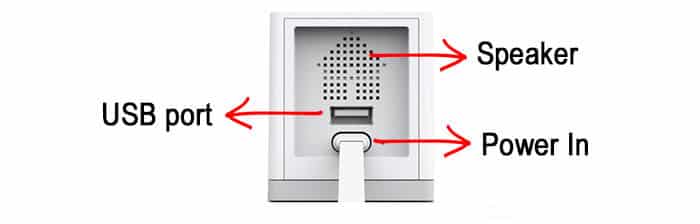
The popular Wyze cam (Version 2) now allows USB out and allows chaining of upto 3 indoor wireless cameras, with an advisory to use only short daisy chaining USB cables (we will discuss this a bit later)

See the source image

And Vivotek is doing the same  with wired cameras by including a 2-port switch and POE extender onboard the camera device.

So maybe more of such daisy chaining  features will start appearing in both wired and wireless camera models from more OEMs in the future. Maybe.

Till that happens, we still may have some options: Involving Bus powered (passive) USB hubs (1x2, 1x3, 1x4) or USB-A-Female-to USB-A-Female splitter cables for wireless cameras and PoE extenders (1x2, 1x4):

These are strictly not daisy chaining type of equipment, but they shift the home run point to an IP camera location and especially useful for installing cameras in close proximity (like fixed focus cameras in multiple directions, with a small PTZ at same location to aid live monitoring). Availability and pricing may be of some concern though as not many brand offer such solution. The only drawback of this design approach is that you can reset all 2-4 connected cameras together using power cycling method and not each one individually (they can be restarted only via graceful software reboot methods).

For USB powered wireless, things a more tricky as extremely low voltage tolerance levels are involved unlike 802.3af/at/bt standard. Refer this URL for USB power details. Here we summarize key points:

USB contact Resistance = 30 milli-Ohm
No. of contacts = 4 // 2 for positive wire, 2 for -ive wire
USB cable resistance (20 AWG wire or best cable) = 33.3  milli-Ohm / meter
We assume 10m as longest cable distance for wireless IP cameras (small installations) , rather than 100m or more (big installations).

So USB cable resistance for 10m cable (10x2x33.3) + 30x4 = 786 Milli-Ohm
Potential drop across a 10m cable link = (786/1000)*(Peak-Current on Home-run) = 0.726 *2= 1.572V
For 1m cable, the drop becomes (1x2x33.3 + 30x4)/1000 * 2 = 0.3732

USB spec requires USB voltage to be 5V +/- 5% or only a 0.25V voltage drop is permissible.  So its clear , we can't use long cables to daisy chain and only 1m  maximum can work, that too if charger outputs a bit higher voltage (such as 5.2-5.4V).  This limits overall usability.  Its safe to say that cluster 2-3 cameras can be used in a single location (or close proximity) at maximum. You may just daisy chain power cable instead and put multiple DC-DC UPS at each camera location rather than trying to use one DC-DC UPS to serve multiple cameras at distant locations

Longer passive USB cables can however be used for 1 camera (0.5A max current) as voltage drop will reduce significantly [its 0.363V for one 10m(30ft) cable serving one camera drawing 0.5A max].


- Suman Kumar Luthra @ APRC-P3 Telecom Sub-Committee